
The demonstration goes well. A form creates a record, a draft appears and a notification reaches the right person. Everyone agrees it looks useful. A week later, the team is back to copying information by hand.
That does not automatically mean the tool failed. It may mean the process never became clear enough to trust during a busy working day.
A demonstration is only the first part
In Microsoft and LinkedIn's 2024 Work Trend Index, 79% of leaders said AI adoption was necessary to stay competitive, while 60% worried their organisation lacked an implementation plan and 59% worried about measuring productivity gains. These are separate, overlapping survey responses, not a measure of actual returns. Report and survey context.
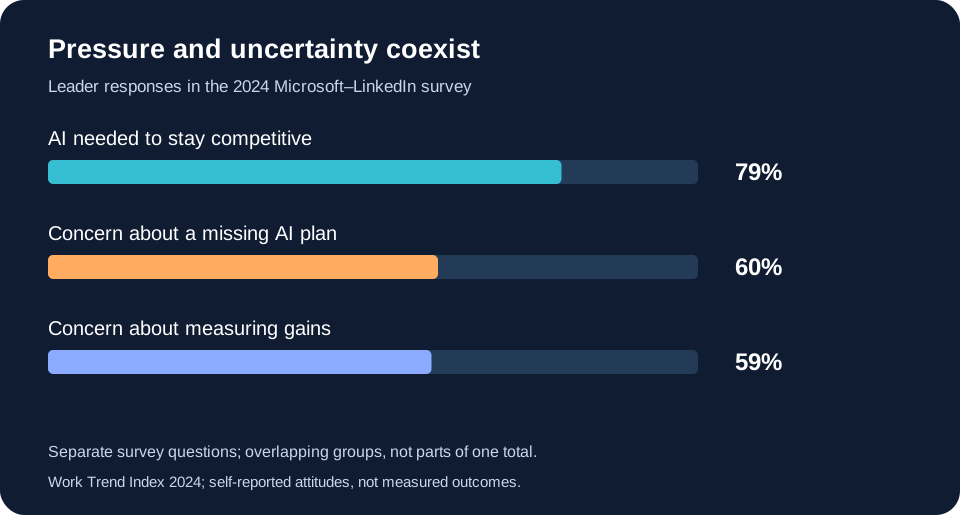
Read the chart values
| Measure | Value |
|---|---|
| AI needed to stay competitive | 79% |
| Concern about a missing AI plan | 60% |
| Concern about measuring gains | 59% |
A team can be excited about a tool and uncertain about using it. Who checks the output? Where does a rejected item go? Should someone wait for the system or handle it manually? If those answers are missing, the familiar route usually wins.
Make the next action visible
Write a short handover that matches the real process. A useful version should tell someone where work arrives, what the statuses mean and which action they own. It should be short enough to consult while handling an actual case.
- Starting point: where does a new item appear?
- Decision: what needs human judgement or approval?
- Exception: what should someone do when a connection fails?
- Completion: where is the final outcome recorded?
Do not bury the most important decision in a long technical document. Put it beside the queue, approval message or checklist where someone needs it.
Train with a rejected case
Outrise's social-content workflow creates platform-specific captions and images, saves assets to Google Drive and sends them to Telegram for approval. Approved content is scheduled through the connected posting service. If a caption or image is rejected, the second Make scenario routes that selected item for regeneration.
The rejection path deserves as much attention in training as the approval button. A user should understand what will change, what will stay and how to check the revised item. Otherwise a working exception route can still feel risky to use.
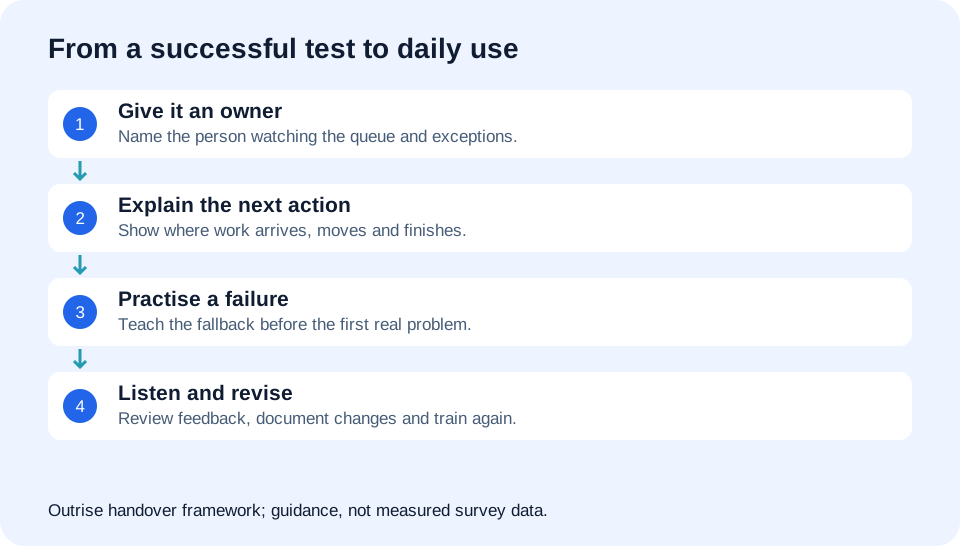
Read the workflow steps
- Give it an owner: Name the person watching the queue and exceptions.
- Explain the next action: Show where work arrives, moves and finishes.
- Practise a failure: Teach the fallback before the first real problem.
- Listen and revise: Review feedback, document changes and train again.
Leave room for feedback from real work
Ask the team to show one case where the workflow felt awkward. Watch it happen instead of asking only whether they liked the system. Small details matter: an unclear label, a notification with too little context or a status that requires unnecessary clicks.
Assign an owner who can gather these examples and decide what should change. Keep a simple record of revisions so that instructions do not drift away from the actual workflow. When a rule changes, explain the reason to the people using it.
Measure use and quality together
Look at whether work is moving through the agreed route, whether exceptions are visible and whether the team can finish without asking the builder every time. More automated activity is not automatically better if it creates confusion downstream.
A useful handover leaves the team capable. They know what the system handles, what they own and where to get help. That confidence is part of delivery, just as much as connecting the apps.
ILLUSTRATIVE DISCUSSION
A question you might be asking.
These are example exchanges prepared by Outrise, not comments from visitors.
Our process works in the demo, but people keep using their old lists. What should we check?
Watch someone handle a normal case and an exception using the instructions. Unclear ownership, labels or fallback steps often show up there.
JOIN THE CONVERSATION
What does this look like in your business?
Share a practical question or experience. Comments are reviewed before they appear.